
Image Recolor
Cross-platform desktop app for recoloring images with specialized support for World of Warcraft texture formats (BLP, DDS), built with Tauri, Vue, and Rust.
Image Recolor
A specialized desktop application for recoloring images with support for World of Warcraft texture formats. Transform textures and icons with interactive HSV color space adjustments and preview your changes in real-time.
Quick Demo
Why I Built It
Working with World of Warcraft modding, I frequently needed to recolor textures and icons—swapping out colors for different variants or themes. The challenge was that WoW uses specialized texture formats like BLP (with DXT compression) that most standard image tools don't handle well.
I discovered that warcraft-rs provides excellent Rust bindings for BLP format support. This sparked an idea: what if I could combine a lightweight desktop UI with powerful Python image processing libraries?
I experimented with PyTauri, a framework that lets you pair Tauri's desktop shell with Python for the backend instead of Rust. This opened up access to mature image manipulation ecosystems:
import numpy as np
from PIL import Image
import matplotlib.pyplot as plt
from pathlib import Path
from collections import Counter
from scipy import ndimage
from skimage import morphology
The PyTauri Optimization Journey
The initial PyTauri approach worked well, but it came with a significant cost: 700+ MiB of disk space is required to install this application. This included the entire Python runtime, all dependencies, and the Tauri shell, far too large for a simple image recoloring tool.
I experimented with optimizations, managing to cut it down to 308.5 MiB through dependency pruning and build tweaks. But I realized the real solution was to eliminate the python libraries entirely.
With AI-assisted refactoring, I migrated the core image processing logic from Python directly to Rust crates. The existing ecosystem of Rust image libraries—combined with careful algorithm translation—provided everything we needed without the Python runtime overhead.
Final result: 21.8 MiB 97% reduction in binary size while maintaining full functionality and actually improving performance.
The result is a cross-platform tool that feels native on Windows, macOS, and Linux while handling both standard formats (PNG, JPG) and specialized WoW formats (BLP) seamlessly.
Key Features
- HSV-based recoloring: Adjust hue, saturation, and value with interactive sliders to transform colors intelligently
- Broad format support:
- Standard: PNG, JPG, BMP, GIF, WebP, TIFF, AVIF
- Specialized: BLP (WoW textures with DXT1/DXT3/DXT5 compression), DDS
- Vector: SVG graphics
- Smart color masking: Two recoloring modes: naive hue scaling for quick adjustments, and intelligent mask-based approach for dominant color preservation
- Fuzzy Select (Magic Wand): Intelligent mask selection tool to isolate specific colors or regions before recoloring, with fine-grained control over selection sensitivity
- Interactive UI: Zoom and pan for detailed editing, real-time preview of changes
- Batch operations: Recolor and export multiple images at once
- Local persistence: Settings and cached images stored locally for fast workflow
Real-World Examples
Icon Variants: Start with an ice_cream.png icon and create different flavors by simply adjusting colors, no manual redesign needed.
Texture Transformation: Before/after example with onyxia textures, with model viewer preview showing how the recolored textures look in-game.
Comparison of Techniques: Side-by-side results—select_1.png shows the naive hue scaling approach, while select_2.png demonstrates the mask-based algorithm that allows more careful hue scaling.
Mask Selection Techniques
The Fuzzy Select (Magic Wand) tool uses a three-step process to intelligently isolate colors and regions for targeted recoloring:
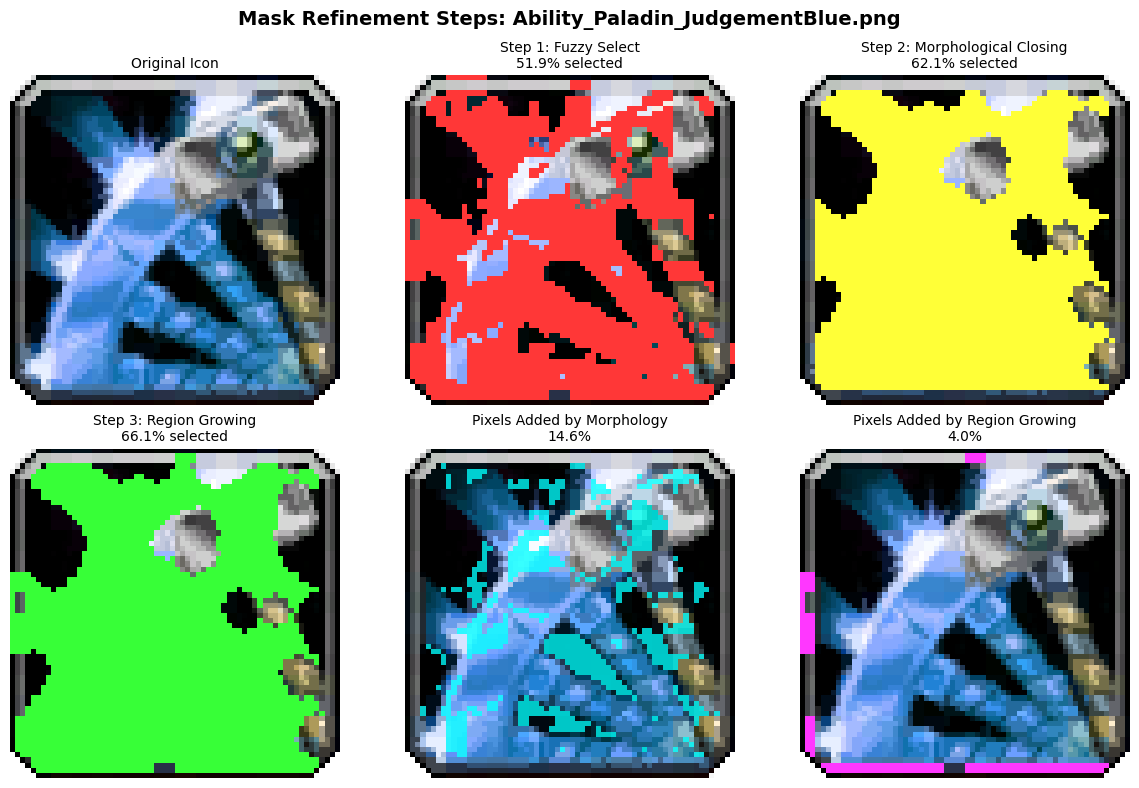
Step 1: Fuzzy Select (Magic Wand)
A seed-based selection algorithm that identifies pixels with similar colors within a tolerance threshold. Click a starting pixel, and it expands to include neighboring pixels that match the color criteria—similar to Photoshop's Magic Wand tool.
Step 2: Morphological Closing
Fills small holes and gaps in the selected region using mathematical morphology operations. This smooths the mask boundaries and eliminates isolated unselected pixels within the main selection area.
Step 3: Region Growing
Expands the selection outward from the initial seed points by evaluating neighboring pixels iteratively. This ensures contiguous color regions are fully captured, even if they vary slightly in shade or have gradual transitions.
Together, these techniques create precise masks that isolate specific colors or objects for recoloring while preserving unselected areas.
Tech Stack
- Frontend: Vue 3 with TypeScript, Tailwind CSS + DaisyUI, Vite build tool, Lucide Vue icons
- Desktop Shell: Tauri 2 (lightweight, cross-platform)
- Backend: Rust core for performance-critical operations
- Image Processing:
imagecrate for standard formatswow_blpfor World of Warcraft BLP formatddsfilefor DirectDraw Surface format- Python libraries (PIL, scipy, scikit-image) for advanced processing
- Storage & Dialogs: Tauri Store plugin, Tauri Dialog, Tauri Opener
What I Learned
- How to architect a Tauri app with clear frontend/backend separation Vue handles the interactive UI, while Rust and Python handle intensive image processing
- Managing multiple specialized image formats in a single application, each with its own quirks and compression schemes
- The power of combining Tauri's cross-platform capabilities with Python's mature image libraries for rapid development of domain-specific tools
- Practical color space transformations and algorithm selection—when simple hue scaling works and when you need intelligent masking for better results
- Building UX for power users: zoom, pan, batch operations, and presets matter more than feature breadth
Links
- Source code and releases: https://github.com/sogladev/image-recolor-free
- Try it out: Download the latest release for your platform